Choosing the right dental design solutions affects clinical accuracy, patient trust, and daily workflow. The ideal platform should support diagnosis, treatment planning, communication, and production. It should also fit your practice, not force your team into an unfamiliar process.
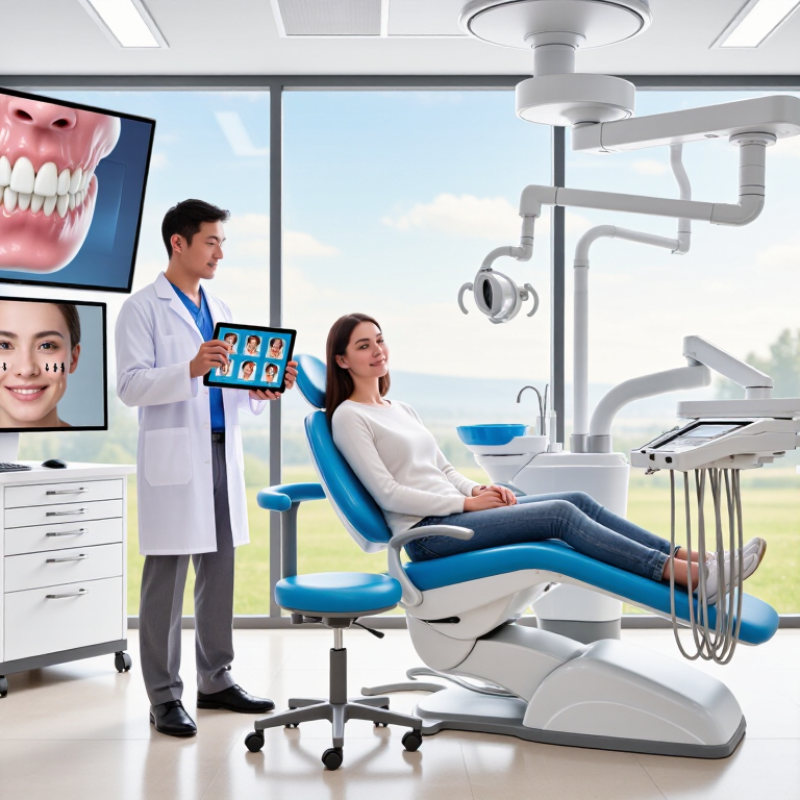
Dr. Christian Coachman, founder of Digital Smile Design, describes digital design as “a communication tool.” That view remains important. A strong system helps dentists explain proposed changes with photographs, facial references, digital scans, and realistic mock-ups. Patients can see how tooth length, contour, and alignment may influence their smiles. The conversation becomes clearer, especially when expectations are difficult to describe.
Reliable dental design solutions should connect smoothly with intraoral scanners, imaging systems, CAD software, and laboratories. Check file compatibility before purchasing. Ask whether the provider offers training, technical support, data protection, and regular updates. Examine the workflow in real cases, from the first scan to the final restoration. A glossy demonstration is not enough. Your team needs speed, precision, and manageable learning demands.
Cost also deserves careful judgment. The cheapest option may create hidden expenses through repeated designs, poor integration, or delayed laboratory communication. The most advanced platform may exceed your actual needs. That is where careful reflection matters. No solution removes clinical responsibility. Software can suggest proportions, but experienced professionals must evaluate function, biology, facial balance, and patient wishes. The best choice is practical, evidence-informed, and flexible enough to improve over time.
Choosing a dental design solution starts with a clear clinical goal, not attractive software features. Define the problem before reviewing tools. Do you need faster crown planning, more predictable implant positioning, or clearer patient communication? Each goal requires different workflows, measurements, and review stages.
Clinical requirements should guide every decision. Consider the procedure type, available imaging, scanning accuracy, and laboratory communication. A restorative case may depend on occlusion, margin visibility, and material thickness. An implant case may require nerve mapping, bone assessment, and a reliable surgical guide workflow. Ask how the design will be checked chairside. Ask who will approve it. Small gaps can become expensive remakes.
Practical experience also matters. Test the solution with typical cases, not only perfect demonstrations. Measure planning time, adjustment frequency, file compatibility, and staff training needs. A clear interface helps, but it cannot replace clinical judgment. I have seen teams focus on speed and overlook documentation requirements. That mistake is easy to repeat. Review data protection, audit trails, and export controls with qualified professionals. Confirm that the workflow supports informed patient discussions and documented consent. A short trial with one clinician may reveal limitations that a sales presentation hides. Choose the system that fits your clinical habits, even if it offers fewer impressive features. Perfect design is unrealistic. Reliable decisions are the real target.
Choosing dental design software starts with workflow, not a colorful interface. In a clinic, scan files should move smoothly from capture to planning, review, and production. Check whether the system supports common file formats and preserves accurate margins during export. Small errors can become visible gaps during the chairside appointment. Test this with a real crown case, not only a polished demonstration. That matters.
Assess chairside usability by timing routine tasks. Can a clinician mark a margin, adjust occlusion, and reopen the case later? Clear navigation reduces training time and prevents avoidable mistakes. Look for automated checks, but do not trust them blindly. Human review remains necessary when scan data contains saliva, motion blur, or missing anatomy. I have found that simple editing tools often outperform complex menus under appointment pressure. Maybe not always.
A dependable platform should record revisions, protect patient data, and offer role-based access. Confirm backup procedures, audit logs, and recovery steps before implementation. Integration with imaging, milling, printing, and laboratory workflows also deserves practical testing. Ask how updates affect stored cases and whether files remain usable after a subscription change. Evaluate support response times with specific technical questions. A trial involving assistants, clinicians, and technicians will expose gaps that a presentation hides. Document those gaps honestly, including limitations your team may need to manage.
Assess software features across the complete digital dental workflow. The chart uses a practical 100-point evaluation model, with higher weights assigned to capabilities that directly affect clinical accuracy, interoperability, and production efficiency.
Interoperability and clinical design tools receive the highest weighting because open data exchange, accurate planning, and predictable outcomes are central to a scalable digital dental workflow.
How to Choose the Best Dental Design Solutions?
Compare Compatibility, Accuracy, and Ease of Use
A dental design solution should fit your existing workflow, not force your team to rebuild it. Check whether it supports common scan files, open export formats, and your laboratory’s milling or printing process. Test the software with real cases, including a full-arch scan and a preparation with deep margins. Small import errors can become visible gaps in the final restoration. Ask about operating system requirements, update policies, and data security. Compatibility sounds simple. It often is not.
Accuracy needs more than an impressive demonstration. Review how the system handles occlusion, contact points, undercuts, and margin detection. Compare digital measurements with a physical model or a trusted reference scan. Experienced technicians should inspect the design before production, especially for complex implant or multi-unit cases. Request validation records, training materials, and clear technical support procedures. Reliable evidence matters more than attractive screenshots.
Ease of use affects consistency across busy days. Look for logical tools, readable controls, quick editing, and sensible error warnings. A short learning curve helps new staff, but proper training remains essential. In my experience, a solution that saves clicks may still create confusion during revisions. I once valued speed too highly and overlooked how difficult case corrections felt. That mistake changed my evaluation process. Now, I ask several users to complete the same case and compare their results. Their feedback often reveals problems that a sales demonstration hides.
Choosing a dental design solution requires more than attractive renders or fast demonstrations. Integration should fit the clinic’s daily workflow, not force staff into repeated data entry. Check whether scans, patient records, imaging files, and design exports move safely between existing systems. Ask about supported file formats, update procedures, and real-world compatibility.
Test the workflow.
A practical trial should include a busy appointment schedule, a design revision, and a failed upload. Small delays matter. Training also deserves close attention. Look for role-based lessons, clear documentation, recorded sessions, and practice exercises using realistic cases. A short onboarding call may not prepare a new technician for complex margins or last-minute changes. Training needs refreshers because staff turnover and software updates are unavoidable.
Support quality becomes visible when something breaks before a patient appointment. Confirm response times, escalation paths, service hours, and remote-assistance controls. Request anonymized service examples, not only promising claims. Data security requires equal scrutiny. Review encryption during transfer and storage, account permissions, audit logs, backup routines, and recovery testing. Ask where data is stored and how access is removed when employees leave. Requirements differ across regions, so confirm responsibilities with qualified compliance and legal professionals. A polished security page is not proof of resilient operations. I have seen teams trust it too quickly. Independent assessments can help, although they may not cover every workflow. Keep written records of answers, test results, and unresolved risks before signing.
| Evaluation Dimension | Weight | What to Evaluate | Reference Benchmark or Requirement | Evidence to Request | Scoring Guide |
|---|---|---|---|---|---|
| Clinical and Design Workflow Fit | 20% | Compatibility with digital impressions, implant planning, restorative design, orthodontic workflows, case review, and approval processes. | The solution should support the practice's primary case types without requiring duplicate data entry or disconnected manual steps. | Workflow demonstration, supported file-format list, sample case journey, and documented limitations. | 1 = Major workflow gaps 3 = Adequate for common cases 5 = Strong fit with minimal workarounds |
| System Integration and Interoperability | 20% | Integration with practice-management software, imaging systems, intraoral scanners, laboratory platforms, scheduling tools, and identity systems. | Prefer documented APIs, standards-based data exchange, import/export capability, and support for common 3D dental file types such as STL, PLY, and OBJ where applicable. | API documentation, integration architecture, supported file formats, data-mapping examples, and implementation plan. | 1 = No practical integration 3 = Basic import/export 5 = Reliable two-way integration with documented interfaces |
| Training and User Adoption | 15% | Onboarding quality, role-based learning, training for clinicians and technicians, and availability of self-service learning resources. | Training should include live instruction, recorded or written materials, practice exercises, and a defined onboarding timeline for new users. | Training curriculum, learning portal, sample agenda, administrator training, and user-adoption metrics. | 1 = Unstructured training 3 = Standard onboarding 5 = Role-based training with measurable competency support |
| Technical Support and Service Levels | 15% | Support hours, response times, escalation procedures, incident communication, and availability of dedicated implementation assistance. | A written service-level agreement should define priority levels, response targets, escalation contacts, maintenance notices, and service availability objectives. | Service-level agreement, support policy, escalation matrix, sample incident report, and customer references with similar workflows. | 1 = Unclear support model 3 = Standard business-hours support 5 = Defined priority response and escalation coverage |
| Data Security and Privacy | 20% | Encryption, access control, audit logging, backups, vulnerability management, privacy obligations, and handling of protected health information. | Data should be encrypted in transit and at rest, protected by role-based access and multi-factor authentication where available, and governed by applicable privacy laws. For United States healthcare data, verify appropriate HIPAA business-associate arrangements when required. | Independent security report or audit summary, encryption details, access-control policy, breach-response plan, retention policy, backup policy, and data-processing terms. | 1 = Limited security evidence 3 = Core controls documented 5 = Strong controls with independent assurance and transparent privacy terms |
| Reliability, Backup, and Business Continuity | 5% | Platform availability, backup frequency, recovery procedures, outage communication, and continuity of active cases. | Look for published availability objectives, tested restoration procedures, defined recovery time and recovery point objectives, and clear export options. | Availability history, business-continuity plan, disaster-recovery test summary, backup schedule, and data-export procedure. | 1 = No continuity evidence 3 = Basic backup and recovery 5 = Tested recovery with clear continuity commitments |
| Scalability and Administration | 3% | Support for additional providers, locations, laboratories, case volume, permissions, and centralized administration. | The solution should allow administrators to add users, assign roles, manage locations, and monitor usage without substantial vendor intervention. | Administration console demonstration, permission model, multi-location workflow, and pricing assumptions for growth. | 1 = Difficult to expand 3 = Supports moderate growth 5 = Centralized and flexible administration |
| Total Cost and Contract Transparency | 2% | Subscription or licensing fees, implementation costs, training charges, storage limits, integration fees, and exit costs. | All recurring and one-time charges should be stated clearly, including data export, storage overages, support tiers, and cancellation terms. | Complete quote, order form, renewal terms, implementation statement of work, and data-export policy. | 1 = Significant hidden costs 3 = Mostly transparent pricing 5 = Complete and predictable total-cost model |
Cost should be measured beyond the initial purchase. A low-priced dental design solution may require expensive upgrades, training, or maintenance later. Check licensing terms, hardware needs, technical support, and data storage fees before deciding. A clear cost comparison should cover at least three years. That detail matters.
Scalability is equally important. A small clinic may begin with crown and bridge designs, then add implant planning or orthodontic workflows. Choose software that can handle more users, larger case volumes, and new file formats without disrupting daily work. Cloud collaboration can help dentists, technicians, and laboratories review designs from different locations. However, internet dependence may slow urgent cases. That risk deserves honest attention.
Value comes from reliable results, efficient communication, and fewer design corrections. Ask how the solution fits your existing scanners, milling equipment, and clinical procedures. Request a practical demonstration using a typical case, such as a molar crown with tight occlusion. Review training quality and response times, not just advertised features. A complicated interface can reduce productivity, even when the technology appears advanced. Teams should also check export options, access controls, and regular software updates. No solution is perfect. A careful trial may reveal workflow problems that a sales presentation cannot show.
WhatsApp us